


CallApp: Caller ID & Block
CallApp Caller ID, Call Recorder & Spam Blocker
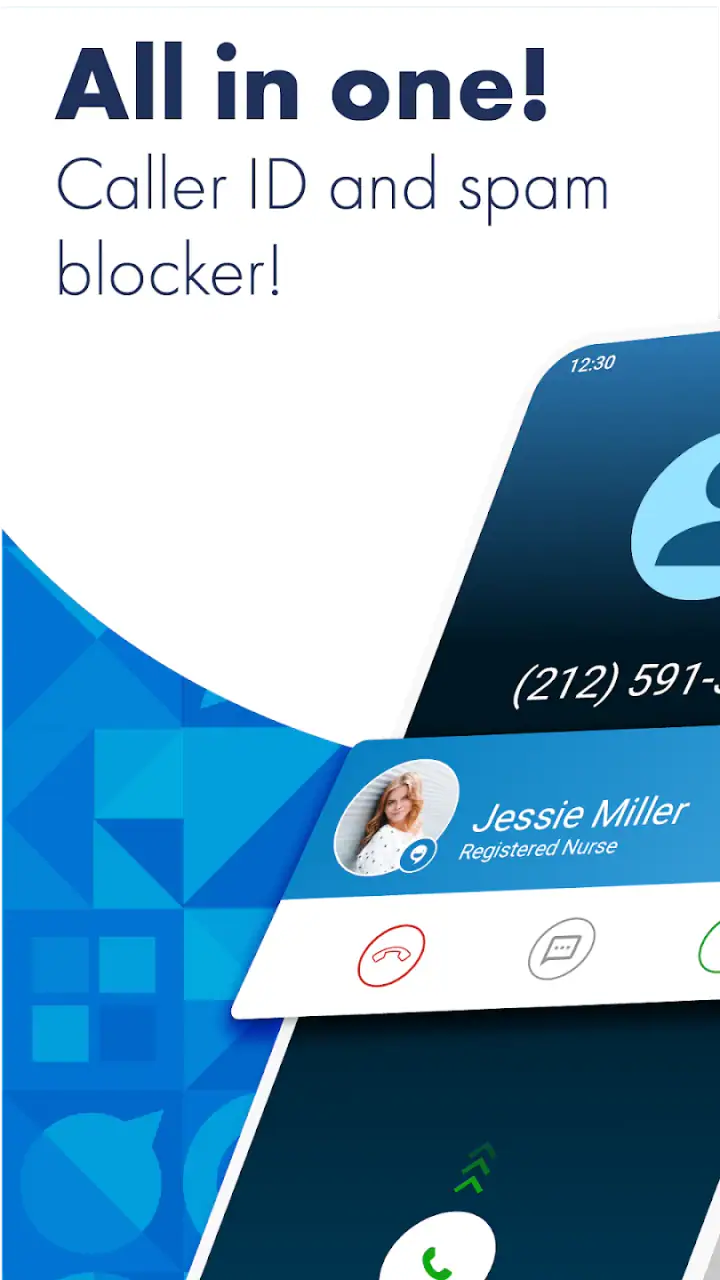
When an unfamiliar number appears on a shared household phone, the question is rarely just “Who is calling?” It is usually whether the call matters, whether someone else in the home should answer it, and whether the interruption is worth the risk. I found CallApp: Caller ID & Block most useful in that exact situation. It turns an ordinary incoming-call screen into a quicker decision point, combining caller identification with tools for dealing with unwanted calls.
This is a communication app from CallApp Caller ID, Call Recorder & Spam Blocker, and it is available for free with optional in-app purchases ranging from $0.99 to $149.99 per item. The app is rated for Everyone, works on Android from version 8.0 onward, and has been around since September 13, 2012. That long presence helps explain why it feels more developed than a simple number lookup utility, although it also means there are more settings and account decisions to think through.
How it works on a shared household phone
My clearest use case is a phone that several people depend on, such as a family handset kept in a kitchen, a small business phone used at home, or a device passed between relatives. With a normal phone app, an unknown number often creates a small argument: answer now, ignore it, or wait for a voicemail. CallApp adds context before that choice. A caller label or warning can help the person holding the phone decide whether to pass it to another household member or leave it alone.
Related News

CallApp: Redefining Caller ID and Blocking in Mobile Ecosystems

KakaoTalk: The Strategic Powerhouse Shaping Mobile Communication
That does not make the app a household switchboard. It does not replace a shared calendar, a family messaging group, or a clear agreement about who handles calls. Its value is narrower and more practical: it helps reduce uncertainty at the moment the phone rings. I would recommend it to a household that regularly receives delivery calls, service calls, school-related calls, or persistent sales calls, especially when different people take turns answering.
A realistic example is a parent expecting a call from a clinic while another person is cooking and a teenager is holding the phone. The incoming information can make it easier to decide whether to interrupt the parent or let the call pass. In the opposite situation, a suspicious-looking call can be ignored without turning the whole household into a guessing game. That small improvement in coordination is where the app feels more useful than a basic contact list.
Related News

Instagram Is No Longer a Photo App. It Is an Attention Engine

Microsoft Teams Mobile: When Collaboration Becomes Navigation

How the NFL App Adapts to Android and iOS Updates

Temu: Elevate Your Shopping Experience to Billionaire Status

Why Traffic Rider Works Best as a Precision Reflex Game

How Google’s Find Hub Transforms Everyday Searches
There is an important boundary, though. Caller identification is helpful context, not proof of identity. A familiar-looking name should not be treated as permission to share private information, approve a payment, or reveal a one-time code. I would still teach every household member to ask the caller to identify themselves and to use an official number when a call involves money, accounts, health information, or urgent claims.
Starting with the right expectations
The first thing I would do after installing CallApp: Caller ID & Block is decide what job I want it to perform. If the goal is simply to recognize unknown callers, I would keep the setup focused on the incoming-call experience. If the goal is to reduce repeated nuisance calls, I would spend more time reviewing blocking and notification behavior rather than enabling every available option immediately.
This matters on a shared device because a setting that feels convenient to one person can confuse another. A call may be blocked before anyone has a chance to explain why it was expected, or a warning may be ignored because the household sees too many alerts. I prefer a short trial period: use the app normally, note which calls were correctly identified, and then adjust the way the household responds. That is more reliable than assuming every label will be perfect.
Gallery
The app is free to install, but the presence of optional purchases is worth discussing before a child or another family member uses the phone. A shared device should have one person responsible for deciding whether any paid feature is needed. The listed purchase range is wide, so I would not treat the free download as a promise that every function or convenience will remain free. The sensible approach is to inspect the purchase screen carefully and keep spending decisions with the device owner.
I also recommend separating the technical setup from the family agreement. First, make the app usable for the person who answers calls most often. Then explain what an identification result means, what should be blocked, and which calls must be checked through another channel. This prevents the app from becoming an unquestioned authority, particularly when older relatives or younger users are involved.
Coordination without handing over control
CallApp works best as a prompt for conversation, not as a substitute for it. In my experience, the most useful household rule is simple: if a call appears important but the intended recipient is unavailable, write down the number, the displayed identity, and the reason given by the caller. Do not rely on memory or on a quick screenshot that may be lost among other images.
For a shared phone, I would also agree on who is allowed to block numbers. Blocking can be satisfying when a nuisance caller keeps returning, but it can create problems if someone blocks a number that another person needs. A better routine is to discuss recurring calls first, especially numbers connected with schools, doctors, couriers, landlords, banks, or local services. The app can support that decision, but the household still needs a human review step.
One less obvious benefit is that identification can reduce unnecessary handoffs. If the caller appears unrelated to anyone in the home, the person holding the phone can deal with it without interrupting someone else. If the call seems relevant to a particular person, it can be passed along immediately. That is a small workflow improvement, but on a busy shared device it prevents repeated “Was that for you?” interruptions.
Another useful habit is to treat unknown calls differently depending on timing. During work, school, or sleep hours, a household may prefer a cautious approach and return calls later through trusted channels. During a delivery window or a repair appointment, the same household may want to answer more readily. The app does not create that policy for you; it gives you information that can make the policy easier to follow.
I would not use it as the only record of household communication. Important details should still go into the contact list, a notes app, or the family’s usual messaging system. That keeps the information available even if the caller label changes or another person uses a different phone.
Age, trust, and the meaning of a caller label
The Everyone age rating makes the app approachable for a broad audience, but an age rating is not the same as a lesson in phone safety. A younger user may see a name on the screen and assume the call is genuine. An older relative may trust a warning too strongly and reject a legitimate call. In both cases, the household should explain that the app offers assistance rather than certainty.
For children, I would establish a rule that calls involving passwords, payments, prizes, threats, or urgent requests must be handed to an adult. For older relatives, I would emphasize that callers can sound convincing even when the number or label looks familiar. The strongest protection is a pause followed by independent verification, not simply a colored indicator or a blocking decision.
Privacy and account boundaries deserve attention as well. I would avoid treating a shared phone as if every person using it has the same access needs. The person responsible for the device should review the app’s settings, explain what information is visible during calls, and decide whether the benefits justify the level of access the app requests during setup. I would not install it casually on someone else’s personal phone without discussing that choice first.
This is especially important when a household mixes personal and shared use. A dedicated family handset can have one clear owner and one agreed workflow. A personal phone borrowed by relatives is different: the owner may not want other people changing block lists, viewing call-related information, or making purchase decisions. CallApp can fit either situation, but the boundaries need to be set by the people using the device rather than assumed.
I also found that trust improves when everyone knows how to challenge an identification result. If a caller label seems wrong, the user should not argue with the screen; they should ask for a callback through a known number or contact the organization independently. That habit makes the app safer and prevents a convenient feature from becoming a source of false confidence.
Where it stands beside ordinary alternatives
The usual alternative is the phone’s built-in caller screen and manual blocking. That approach is quieter and simpler. It creates fewer setup decisions and may be enough for someone who receives very few unknown calls. It is also easier to explain to a family member who wants nothing more than a basic phone experience.
CallApp becomes more attractive when unknown calls are frequent and the household wants more context before answering. Its combination of caller identification and spam blocking is more proactive than scrolling through recent calls and blocking numbers one by one. For a person who regularly handles calls for several people, that extra context can save time.
There is a trade-off between convenience and complexity. A built-in phone app usually has a smaller learning curve, while CallApp asks the user to understand more of its behavior and settings. On a personal phone, that may be a worthwhile exchange. On a shared device, every additional decision has to be explained to the other users. If the household will not review the settings together, the simpler alternative may be better.
I would also choose a different approach for someone who is extremely cautious about adding a communication service to a personal phone. In that case, the built-in caller tools, careful contact management, and a rule of never trusting unexpected requests may provide enough protection. CallApp is not automatically the right answer just because it has more functions. Its value depends on whether the household will use the information thoughtfully.
What the scale of the app tells me
CallApp has a 4.3 average from around 1.7 million ratings, with roughly 49 thousand written reviews, and it has passed 100 million installs. Those figures suggest that this is a mature, widely used communication app rather than a niche experiment. They also mean the app serves many different phone habits, so I would not expect every user to have the same experience with labels, alerts, or blocking decisions.
The developer name, CallApp Caller ID, Call Recorder & Spam Blocker, makes its broader purpose clear, but I would focus on the functions I actually need instead of assuming every related tool belongs in my daily routine. A good installation is one that makes answering calls easier without turning the phone into a constant stream of notices.
Its minimum requirement of Android 8.0 makes it suitable for many older Android phones, although compatibility is only the starting point. On a shared device, the more important question is whether the phone remains comfortable for the person who uses it most. If the interface feels busy or the alerts are too prominent, the household may stop paying attention to the information that matters.
Practical habits that make the app more useful
I would begin by adding trusted contacts properly and making sure important people are not treated as unknown callers simply because they use a different number. Next, I would observe how the app handles recurring nuisance calls before creating a large block list. A short, deliberate list is easier to maintain than one built impulsively after every frustrating interruption.
When a call is identified, I would use the result to choose a response, not to end the thinking process. For a possible service call, answer but avoid sharing sensitive information until the caller is verified. For a repeated nuisance call, block it after confirming that nobody in the household needs it. For an unfamiliar but plausible call, let it go to voicemail or return it through a trusted channel.
For shared use, I would keep a tiny household note with three items: who normally handles important calls, which types of calls require an adult, and which organizations should always be contacted through their official channels. That note does more for safety than any single label. It also helps a new or occasional user understand the household’s expectations without changing app settings.
Finally, I would review the setup after the app has been used for a while. If family members are ignoring warnings, receiving too many interruptions, or missing legitimate calls, the problem may be the workflow rather than the app itself. Adjust the rules, reduce unnecessary notifications where possible, and keep only the parts that genuinely help the household make better decisions.
My household verdict
I see CallApp as a strong fit for households that share a phone or regularly coordinate who should handle incoming calls. Its caller identification and spam-blocking focus can reduce uncertainty, save interruptions, and give less experienced users a useful first signal. The free entry point also makes it easy to test before deciding whether the everyday benefit is worth keeping.
Still, I would not install it and then forget about it. The app works best when one person owns the setup, paid choices are kept under control, and every user understands that identification is not verification. Families who need a very simple phone experience, or people who prefer to minimize third-party communication tools, may be happier with the built-in alternative.
For my own recommendation, the deciding factor is the household’s call volume and level of coordination. If unknown calls are a constant nuisance and several people depend on the same device, I would give CallApp a try. If the phone is personal, quiet, and already easy to manage, its added layer may not justify the extra setup. Used with sensible boundaries, though, it can turn a shared phone from a source of interruptions into a more manageable household tool.
FAQs for CallApp: Caller ID & Block
What features does CallApp: Caller ID & Block offer?
CallApp provides a comprehensive suite of features designed to enhance your calling experience. It includes caller ID, call blocking, call recording, and contact management. The app identifies unknown callers and blocks spam calls automatically. Additionally, it offers a call recorder to keep track of important conversations. With these features, it aims to provide a seamless and secure communication experience.
Is CallApp: Caller ID & Block free to use?
CallApp offers a free version with essential features such as caller ID and spam blocking. However, to access premium features like advanced call recording and an ad-free experience, users can opt for a subscription plan. This allows users to tailor the app's functionalities to their specific needs, whether they prefer a free or premium experience.
How does CallApp protect user privacy?
CallApp takes user privacy seriously by implementing robust security measures. The app requires permission to access your contacts and calls, but it uses this information solely to provide its services. User data is encrypted and stored securely, and CallApp adheres to strict privacy policies to ensure that your information is not shared with third parties without consent.
Can CallApp identify all unknown callers?
While CallApp boasts a vast database for identifying unknown callers, it may not recognize every number, especially those that are newly registered or private. However, it continuously updates its database to improve accuracy. Users can also contribute by reporting unknown numbers, helping enhance the app's caller identification capabilities over time.
Is CallApp compatible with all Android and iOS devices?
CallApp is compatible with a wide range of Android and iOS devices. However, users should ensure their device meets the minimum operating system requirements specified by the app developers. Regular updates are provided to maintain compatibility with the latest OS versions, ensuring users have access to the latest features and improvements.
Pros
- Comprehensive caller ID database.
- Efficient call blocking features.
- User-friendly interface design.
- Customizable themes and settings.
- Minimal battery consumption.
Cons
- Contains ads in the free version.
- Limited features without premium.
- Occasional lag on older devices.
- Requires access to contacts.
- Data privacy concerns for some users.


